
FAQ/Support
Getting Started
ANSWER
In addition to in-store ordering, you can also access our online ordering options from any product page or our Online Ordering page. If you need any technical assistance, please contact the lab.
ANSWER
You can easily access pricing for most of our products and services directly from the product page within our website. For custom sizes, digital retouching and design, please contact the lab. We will be happy to provide you with a quote.
Getting Started
ANSWER
In addition to in-store ordering, you can also access our online ordering options from any product page or our Online Ordering page. If you need any technical assistance, please contact the lab.
ANSWER
You can easily access pricing for most of our products and services directly from the product page within our website. For custom sizes, digital retouching and design, please contact the lab. We will be happy to provide you with a quote.
General Questions
ANSWER
Because different people have different needs, we offer two print workflows for you to choose from: Full Service and Monitor Match. Full Service ordering offers FREE color correction, online & in-store ordering options, as well as a 100% satisfaction guarantee. Monitor Match ordering is for anyone who is doing their own image adjustments and color corrections on a calibrated monitor. Monitor Match ordering requires an account signup, offers wholesale pricing through our online-only ordering software, and all products are backed by our Monitor Match Guarantee™. Simply select the workflow that fits your printing needs, and start ordering!
ANSWER
No. Due to virus issues and email file size limitations, we are not able to accept files via email. We do offer easy in-store and online ordering options for you to choose from, and we are happy to assist you.
ANSWER
Orders received by 3:00 p.m. (CST) will be completed by 12:00 noon (CST), Monday thru Friday, within the listed number of processing days required. No order will exceed 5 days unless indicated, or you are specifically notified by the lab. An email notification will be sent once the order has been completed for your convenience. NOTE: Shipping time not included in Turnaround time.
For a complete list of our product turnaround times click here.
If you need to reduce the standard production time for an item, a VIP Rush may be added for an additional $4.95 plus 10% of the order total for most orders.
ANSWER
Please contact the lab immediately if a change or update needs to be made. Depending on where your order is in production, we will try our best to accommodate any change requests or cancel your order so that you can resend it.
ANSWER
Yes. Custom sizes are available upon request. For a price quote and ordering method, please contact the lab.
ANSWER
Unfortunately, no. We do not indefinitely retain images from previous orders submitted. However, if you have ordered online from our ROES ordering system, you have the ability to open a previous order you have sent, and submit it as a new or revised order. If you would like help re-sending a previous order, please contact the lab, and we will be happy to show you how.
ANSWER
Yes. Our ROES Web ordering system is web-based and mobile-friendly! Click here for a detailed look.
ANSWER
Absolutely! We provide digital printing services from your digital images on over 700+ products, and scanning services for prints to be digitized for printing.
NOTE: We do not scan or reproduce professional images without a copyright release for printing. Please contact your photographer or copyright holder to obtain a copyright release.
ANSWER
Professional photo labs specialize in professional quality photo printing, while consumer labs like Walmart, Costco and Sams do not. A professional lab will offer professional grade papers, maintain professional quality standards, and have a staff trained to provide expert advice about your images and how to make them look their best.
ANSWER
Yes. Your negatives are YOUR negatives, and are important should you decide to produce large prints and higher resolution scans in the future. We are happy to provide you with your negatives in archival sleeving, cut 4-strip, 5-strip or long-rolled
ANSWER
Yes. If you are a professional photographer editing your own images on a calibrated monitor, we offer “pro” pricing (wholesale pricing) when you order through our ROES Monitor Match ordering system.
ANSWER
Yes. Please contact the lab for more details.
General Questions
ANSWER
Because different people have different needs, we offer two print workflows for you to choose from: Full Service and Monitor Match. Full Service ordering offers FREE color correction, online & in-store ordering options, as well as a 100% satisfaction guarantee. Monitor Match ordering is for anyone who is doing their own image adjustments and color corrections on a calibrated monitor. Monitor Match ordering requires an account signup, offers wholesale pricing through our online-only ordering software, and all products are backed by our Monitor Match Guarantee™. Simply select the workflow that fits your printing needs, and start ordering!
ANSWER
No. Due to virus issues and email file size limitations, we are not able to accept files via email. We do offer easy in-store and online ordering options for you to choose from, and we are happy to assist you.
ANSWER
Orders received by 3:00 p.m. (CST) will be completed by 12:00 noon (CST), Monday thru Friday, within the listed number of processing days required. No order will exceed 5 days unless indicated, or you are specifically notified by the lab. An email notification will be sent once the order has been completed for your convenience. NOTE: Shipping time not included in Turnaround time.
For a complete list of our product turnaround times click here.
If you need to reduce the standard production time for an item, a VIP Rush may be added for an additional $4.95 plus 10% of the order total for most orders.
ANSWER
Please contact the lab immediately if a change or update needs to be made. Depending on where your order is in production, we will try our best to accommodate any change requests or cancel your order so that you can resend it.
ANSWER
Yes. Custom sizes are available upon request. For a price quote and ordering method, please contact the lab.
ANSWER
Unfortunately, no. We do not indefinitely retain images from previous orders submitted. However, if you have ordered online from our ROES ordering system, you have the ability to open a previous order you have sent, and submit it as a new or revised order. If you would like help re-sending a previous order, please contact the lab, and we will be happy to show you how.
ANSWER
Yes. Our ROES Web ordering system is web-based and mobile-friendly! Click here for a detailed look.
ANSWER
Absolutely! We provide digital printing services from your digital images on over 700+ products, and scanning services for prints to be digitized for printing.
NOTE: We do not scan or reproduce professional images without a copyright release for printing. Please contact your photographer or copyright holder to obtain a copyright release.
ANSWER
Professional photo labs specialize in professional quality photo printing, while consumer labs like Walmart, Costco and Sams do not. A professional lab will offer professional grade papers, maintain professional quality standards, and have a staff trained to provide expert advice about your images and how to make them look their best.
ANSWER
Yes. Your negatives are YOUR negatives, and are important should you decide to produce large prints and higher resolution scans in the future. We are happy to provide you with your negatives in archival sleeving, cut 4-strip, 5-strip or long-rolled
ANSWER
Yes. If you are a professional photographer editing your own images on a calibrated monitor, we offer “pro” pricing (wholesale pricing) when you order through our ROES Monitor Match ordering system.
ANSWER
Yes. Please contact the lab for more details.
File Preparation
ANSWER
Your images need to be saved in JPG format, 8-bit, RGB color mode, and use the sRGB Color Profile. Should you have any additional questions concerning file preparation feel free to call the lab for further information.
ANSWER
Both our ROES Full Service and Monitor Match Ordering Software require your images to be saved as a JPG. If you have another file type that you would like to submit for printing, please contact the lab for details and ordering options.
ANSWER
Images should be saved in RGB color mode, and use the sRGB Color Profile. If your image happens to be saved in a different colorspace/color mode that you would like to submit for printing, please contact the lab for details and ordering options.
ANSWER
It is recommended that you keep your image at its original file size no matter what dimensions you wish to print for the best possible output. Image crop and zoom tools are available within our ordering systems for you to utilize.
File Preparation
ANSWER
Your images need to be saved in JPG format, 8-bit, RGB color mode, and use the sRGB Color Profile. Should you have any additional questions concerning file preparation feel free to call the lab for further information.
ANSWER
Both our ROES Full Service and Monitor Match Ordering Software require your images to be saved as a JPG. If you have another file type that you would like to submit for printing, please contact the lab for details and ordering options.
ANSWER
Images should be saved in RGB color mode, and use the sRGB Color Profile. If your image happens to be saved in a different colorspace/color mode that you would like to submit for printing, please contact the lab for details and ordering options.
ANSWER
It is recommended that you keep your image at its original file size no matter what dimensions you wish to print for the best possible output. Image crop and zoom tools are available within our ordering systems for you to utilize.
Color Management
ANSWER
The most common reason prints do not match is because the monitor has not yet been calibrated to the industry standard of color using a colorimeter device. For additional information about monitor calibration, please see below or contact the lab to speak with our Support Staff.
ANSWER
To calibrate your monitor, you must use a calibration device (colorimeter) so that your monitor matches the industry standard of color. If you have not yet done this, then your monitor is most likely not calibrated. If you wish to calibrate your monitor, come visit us in store or see below to learn more about our Monitor Calibration services.
ANSWER
When ordering through our ROES Monitor Match ordering system, we guarantee your prints will match a quality, properly calibrated monitor. If your prints don’t match your screen, then we’ll reprint your order at no charge or give you your money back!
ANSWER
Yes. We offer Monitor Calibration Services by appointment. You will need to bring in your monitor, computer, 2 power cables, and monitor-to-computer connection cord (VGS, DVI, Mini DVI, etc.) as well as your operating system’s username and password. We also offer In-Studio Monitor Calibrations Services to qualified customers. Please visit our Monitor Calibration Services page for pricing and more information.
ANSWER
Yes. We offer four free 8×10 Monitor Evaluation prints to evaluate your monitor’s calibration when you sign up for a Monitor Match Workflow Account and order through our ROES Monitor Match ordering software. For a Monitor Match Kit, please visit us in store or request a kit here.
ANSWER
Yes, we do. ICC Profiles are specific to each product and are available for download from each product page under the Product Resources tab. For specific instructions on how to utilize ICC Profiles, please contact the lab and we’ll be happy to help you.
Color Management
ANSWER
The most common reason prints do not match is because the monitor has not yet been calibrated to the industry standard of color using a colorimeter device. For additional information about monitor calibration, please see below or contact the lab to speak with our Support Staff.
ANSWER
To calibrate your monitor, you must use a calibration device (colorimeter) so that your monitor matches the industry standard of color. If you have not yet done this, then your monitor is most likely not calibrated. If you wish to calibrate your monitor, come visit us in store or see below to learn more about our Monitor Calibration services.
ANSWER
When ordering through our ROES Monitor Match ordering system, we guarantee your prints will match a quality, properly calibrated monitor. If your prints don’t match your screen, then we’ll reprint your order at no charge or give you your money back!
ANSWER
Yes. We offer Monitor Calibration Services by appointment. You will need to bring in your monitor, computer, 2 power cables, and monitor-to-computer connection cord (VGS, DVI, Mini DVI, etc.) as well as your operating system’s username and password. We also offer In-Studio Monitor Calibrations Services to qualified customers. Please visit our Monitor Calibration Services page for pricing and more information.
ANSWER
Yes. We offer four free 8×10 Monitor Evaluation prints to evaluate your monitor’s calibration when you sign up for a Monitor Match Workflow Account and order through our ROES Monitor Match ordering software. For a Monitor Match Kit, please visit us in store or request a kit here.
ANSWER
Yes, we do. ICC Profiles are specific to each product and are available for download from each product page under the Product Resources tab. For specific instructions on how to utilize ICC Profiles, please contact the lab and we’ll be happy to help you.
ROES Ordering
ANSWER
Once you have launched our desktop ordering systems, most product catalogs are accessible from the home page. Simply click on the product you are looking for, import your images, and add items to the shopping cart. For additional instructions on how to order from our desktop launches, contact the lab or watch the tutorial on our YouTube channel.
For our ROES Web ordering system getting started is as simple as clicking a link to the web-based system, and using the top navigation bar to select your product catalog.
ANSWER
The Save for Later feature is available in either of our downloadable ROES launches (Full Service or Monitor Match). From the Shopping Cart tab in ROES, click on the Save button in the lower right hand corner of the screen. Give your cart a name and click enter. You can now access your saved cart from the Order History tab at any time. (This feature is currently not available in ROES Web.)
ANSWER
Yes. We have a full library of How-To videos that cover everything from basic ordering to customizing products using the full featured tools available in the ordering system on our YouTube channel.
ANSWER
Please reference the How-To video on our YouTube channel for step-by-step instructions on creating packages in our ROES ordering system. Creating packages is a great way to speed up your ordering process. For more information, please call or visit us in store.
ANSWER
Our ROES ordering system offers a variety of editing capabilities, includingimage cropping, tilt/rotation, B&W/sepia conversion, and the ability to add text. Additional features available through our Full Service and Professional systems are multi-image collage creation and background and border color options. Color adjustment option tools are not available within our ordering system, but color correction is FREE when you order through our Full Service print workflow.
ANSWER
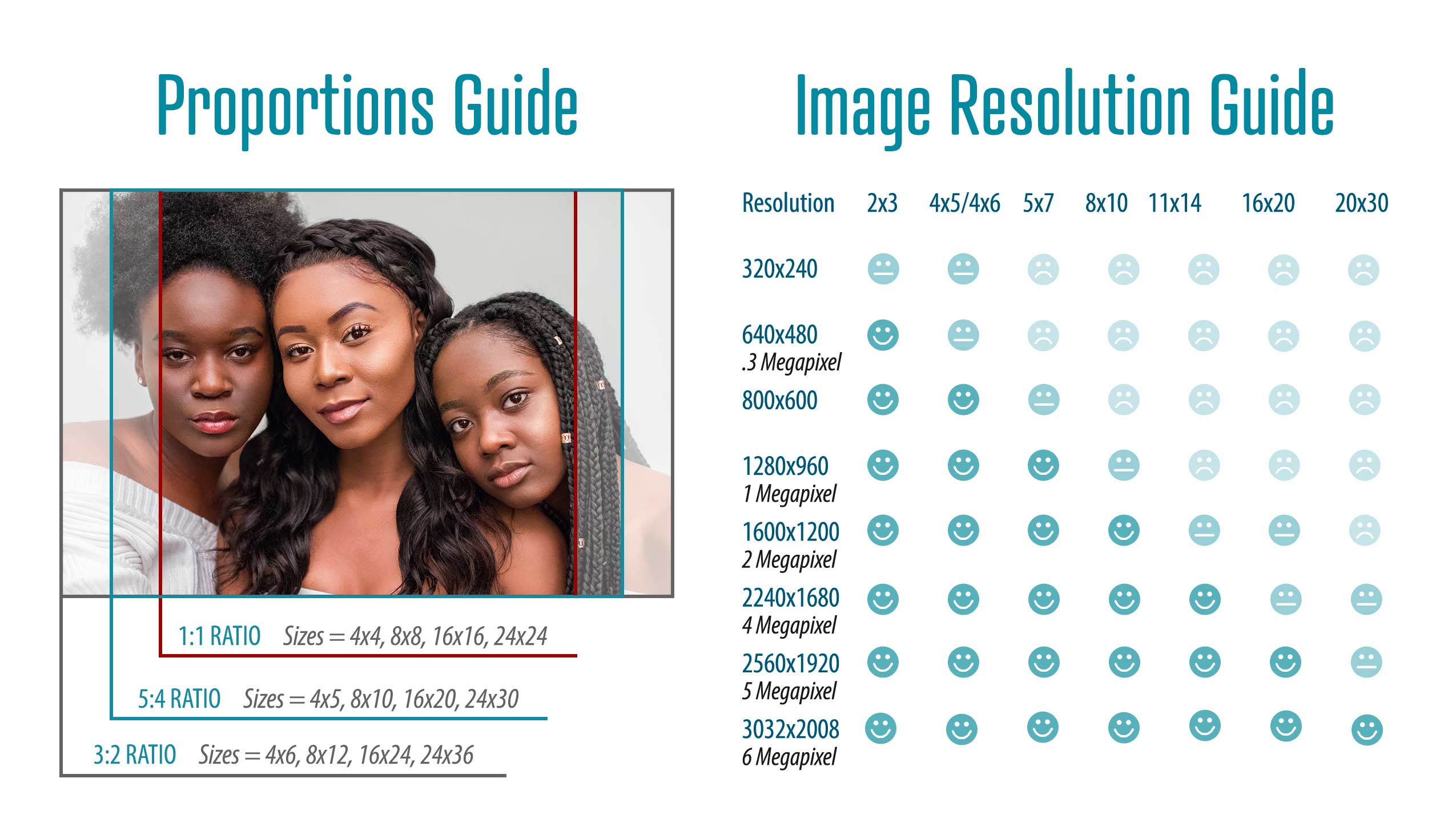
Yes. The software displays the correct dimensions for the size of print selected. If your image is cropping, we recommend selecting a full frame size (4×6, 8×12, 16×24, etc.), or float your image within the specific size you need. For further clarification on image cropping and aspect ratio, contact the lab.
ANSWER
Launch issues are rare, but can be caused by a number of factors, including a recent operating system update. Please contact the lab so that we may quickly help you to resolve the issue.
ANSWER
First, make sure that you have not lost your internet connection, as this is a common reason why an order would fail to send. If you are ordering from a workplace computer, you may have firewall or antivirus restrictions preventing you from placing an order. We recommend that you contact your IT department for assistance. Contact the lab if none of the above issues apply so that we can assist you in resolving the error.
ANSWER
If you are noticing a color shift between your editing software and our ROES ordering software, make sure your images are saved in the sRGB colorspace and in RGB color mode. Refer to our File Preparation requirements
ANSWER
You can clear the ROES cache by clicking on Diagnostic Tools in the lower right corner of the ROES Home page. Click on Clear Caches and when prompted select Clear Both Caches and click OK. Clearing the cache periodically will help to keep the software running smoothly.
ROES Ordering
ANSWER
Once you have launched our desktop ordering systems, most product catalogs are accessible from the home page. Simply click on the product you are looking for, import your images, and add items to the shopping cart. For additional instructions on how to order from our desktop launches, contact the lab or watch the tutorial on our YouTube channel.
For our ROES Web ordering system getting started is as simple as clicking a link to the web-based system, and using the top navigation bar to select your product catalog.
ANSWER
The Save for Later feature is available in either of our downloadable ROES launches (Full Service or Monitor Match). From the Shopping Cart tab in ROES, click on the Save button in the lower right hand corner of the screen. Give your cart a name and click enter. You can now access your saved cart from the Order History tab at any time. (This feature is currently not available in ROES Web.)
ANSWER
Yes. We have a full library of How-To videos that cover everything from basic ordering to customizing products using the full featured tools available in the ordering system on our YouTube channel.
ANSWER
Please reference the How-To video on our YouTube channel for step-by-step instructions on creating packages in our ROES ordering system. Creating packages is a great way to speed up your ordering process. For more information, please call or visit us in store.
ANSWER
Our ROES ordering system offers a variety of editing capabilities, includingimage cropping, tilt/rotation, B&W/sepia conversion, and the ability to add text. Additional features available through our Full Service and Professional systems are multi-image collage creation and background and border color options. Color adjustment option tools are not available within our ordering system, but color correction is FREE when you order through our Full Service print workflow.
ANSWER
Yes. The software displays the correct dimensions for the size of print selected. If your image is cropping, we recommend selecting a full frame size (4×6, 8×12, 16×24, etc.), or float your image within the specific size you need. For further clarification on image cropping and aspect ratio, contact the lab.
ANSWER
Launch issues are rare, but can be caused by a number of factors, including a recent operating system update. Please contact the lab so that we may quickly help you to resolve the issue.
ANSWER
First, make sure that you have not lost your internet connection, as this is a common reason why an order would fail to send. If you are ordering from a workplace computer, you may have firewall or antivirus restrictions preventing you from placing an order. We recommend that you contact your IT department for assistance. Contact the lab if none of the above issues apply so that we can assist you in resolving the error.
ANSWER
If you are noticing a color shift between your editing software and our ROES ordering software, make sure your images are saved in the sRGB colorspace and in RGB color mode. Refer to our File Preparation requirements
ANSWER
You can clear the ROES cache by clicking on Diagnostic Tools in the lower right corner of the ROES Home page. Click on Clear Caches and when prompted select Clear Both Caches and click OK. Clearing the cache periodically will help to keep the software running smoothly.
Shipping
ANSWER
Pricing is based on order total and shipping method selected. For a full list of shipping rates visit our Shipping page. If you have any questions please contact customer service at customerservice@digitalprolab.com or (210) 377-3686.
ANSWER
Yes. When you select our “Ship to Alternate Address” option, your order will be shipped in un-branded packaging, with your return address and will not include any pricing or billing information. This option is great for professional photographers who would like for us to handle the shipment of their packages to their clients directly.
ANSWER
After your order has been packaged for shipment, you will receive an email with a tracking number so you can monitor your package delivery status. If you do not receive an email notification that your order has been shipped, please contact customer service at customerservice@digitalprolab.com or (210) 377-3686.
ANSWER
Yes. However, international shipping is not available in our ordering software. Shipping rates will be determined by your order total and the international location where you need your order shipped. Please contact customer service at customerservice@digitalprolab.com or (210) 377-3686 for a shipping quote.
ANSWER
Please contact our shipping department immediately by phone at (210) 377-3686. Though we take every precaution to maintain the quality of products shipped, sometimes damage in transport may occur. We will do everything we can to ensure you receive a replacement order in a timely manner.
ANSWER
Once your order is completed, shipment arrival times are determined by the type of shipment selected and the delivery location. Although shipment times may vary, below is a general list for your reference:
Standard | 5-7 Days
Priority | 2-5 Days
UPS Ground | Varies
3DAYselect
2DAY
Overnight | 1 business day (mostly)
Need more info? Click here for our turnaround times PDF.
ANSWER
Yes. We are happy to provide courier services within the San Antonio area. Please contact the lab at (210) 377-3686 for details and delivery rates.
ANSWER
If you have recently moved to a new address and would like us to update your shipping and contact information, please contact the lab and we would be happy to make any changes to your account.
ANSWER
We offer United States Postal Service (USPS) Standard and Priority options, as well as UPS Ground and UPS 2-Day delivery. If you need your order guaranteed for a quicker delivery, please contact our shipping department for additional options and shipping rates. We would also be happy to help expedite your order with a VIP Rush, so your order ships as soon as possible.
Shipping
ANSWER
Pricing is based on order total and shipping method selected. For a full list of shipping rates visit our Shipping page. If you have any questions please contact customer service at customerservice@digitalprolab.com or (210) 377-3686.
ANSWER
Yes. When you select our “Ship to Alternate Address” option, your order will be shipped in un-branded packaging, with your return address and will not include any pricing or billing information. This option is great for professional photographers who would like for us to handle the shipment of their packages to their clients directly.
ANSWER
After your order has been packaged for shipment, you will receive an email with a tracking number so you can monitor your package delivery status. If you do not receive an email notification that your order has been shipped, please contact customer service at customerservice@digitalprolab.com or (210) 377-3686.
ANSWER
Yes. However, international shipping is not available in our ordering software. Shipping rates will be determined by your order total and the international location where you need your order shipped. Please contact customer service at customerservice@digitalprolab.com or (210) 377-3686 for a shipping quote.
ANSWER
Please contact our shipping department immediately by phone at (210) 377-3686. Though we take every precaution to maintain the quality of products shipped, sometimes damage in transport may occur. We will do everything we can to ensure you receive a replacement order in a timely manner.
ANSWER
Once your order is completed, shipment arrival times are determined by the type of shipment selected and the delivery location. Although shipment times may vary, below is a general list for your reference:
Standard | 5-7 Days
Priority | 2-5 Days
UPS Ground | Varies
3DAYselect
2DAY
Overnight | 1 business day (mostly)
Need more info? Click here for our turnaround times PDF.
ANSWER
Yes. We are happy to provide courier services within the San Antonio area. Please contact the lab at (210) 377-3686 for details and delivery rates.
ANSWER
If you have recently moved to a new address and would like us to update your shipping and contact information, please contact the lab and we would be happy to make any changes to your account.
ANSWER
We offer United States Postal Service (USPS) Standard and Priority options, as well as UPS Ground and UPS 2-Day delivery. If you need your order guaranteed for a quicker delivery, please contact our shipping department for additional options and shipping rates. We would also be happy to help expedite your order with a VIP Rush, so your order ships as soon as possible.